
Notion upgrades Auto, the model router that picks a model per task
TL;DR
On October 20, 2026 Notion published how Auto, its model router, chooses a model for each task. It routes work across frontier and lighter models using pairwise Elo rankings on seven rubrics inside a simulated workspace called Gymmy. Notion says Auto delivers about 90% of frontier-model quality at about 90% lower average credit cost.
- Status
- Live
- Released
- Plans
- Business, Enterprise
What changed
Auto is not a Notion-built model. It is the router in the model picker, on by default for Notion Agent and for a Custom Agent's model setting. For each task it picks from models Notion has evaluated, limited to the models and providers the workspace allows.
Notion's October 20 engineering post, by Ghita Houir Alami, describes the evaluation behind the upgrade that shipped with the October 19 agent rebuild:
- Pairwise Elo. An ensemble of frontier models compared two outputs at a time and picked a winner against a rubric. Notion turned those head-to-head results into Elo rankings, the same style of rating used to rank chess players. The published chart covers seven rubrics: task resolution, factuality, tool use, writing quality, responsiveness, workspace context, and action safety.
- Gymmy. To run those tasks, Notion built a simulated workspace that loads application code, databases, and search into isolated sandboxes with a saved copy of workspace data. Models including GPT-6 Astra, Opus 5.5, GPT-6.1 Sol, and Auto attempted the same tasks from the same starting state. The post says the analyses use customers who opted into data sharing.
- A calibrated judge for scale. Full pairwise judging was too slow to repeat, so Notion trained a single judge until its rankings matched the Elo order. Pairwise and pointwise scores agreed more than 80% of the time.
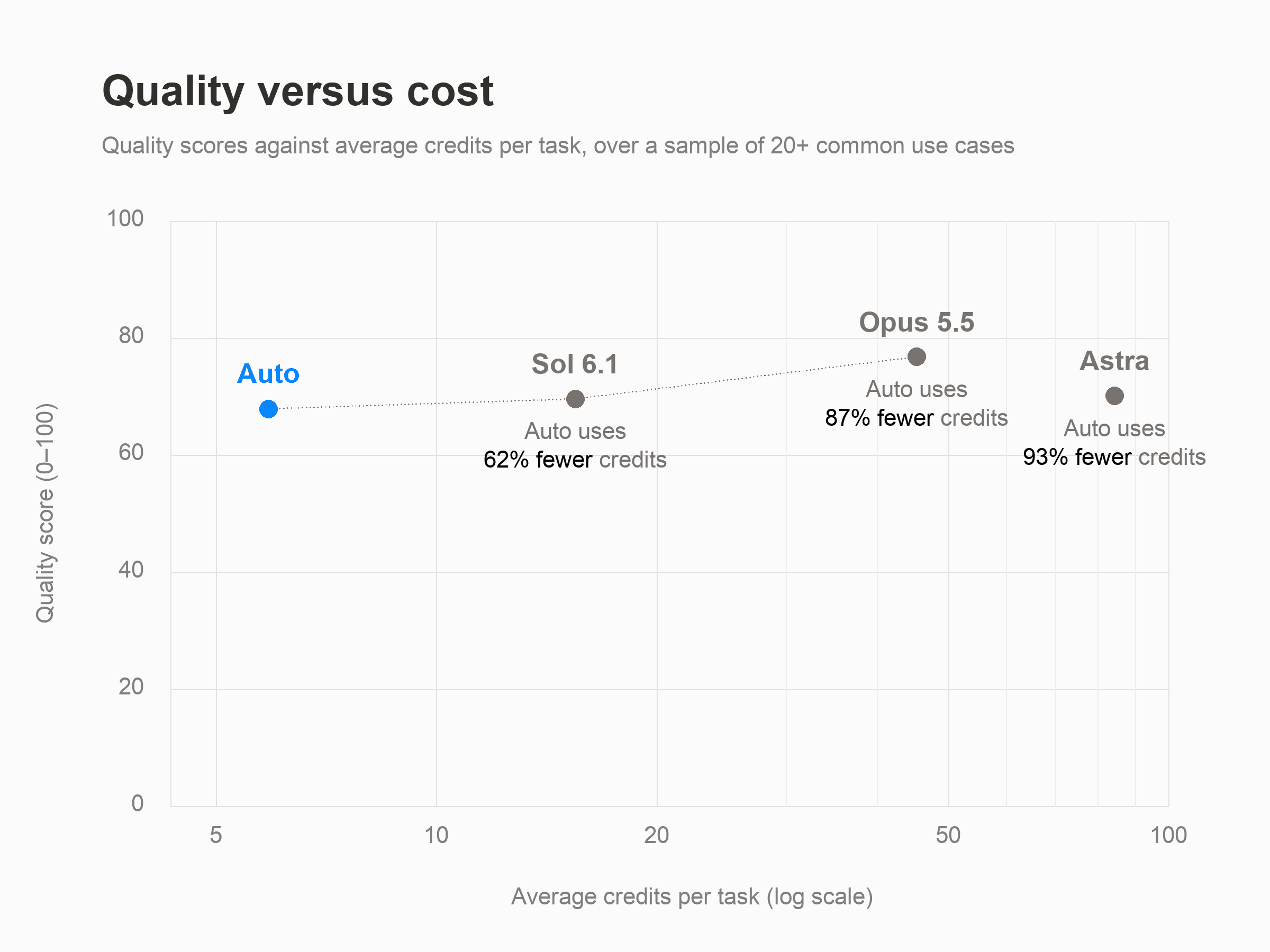
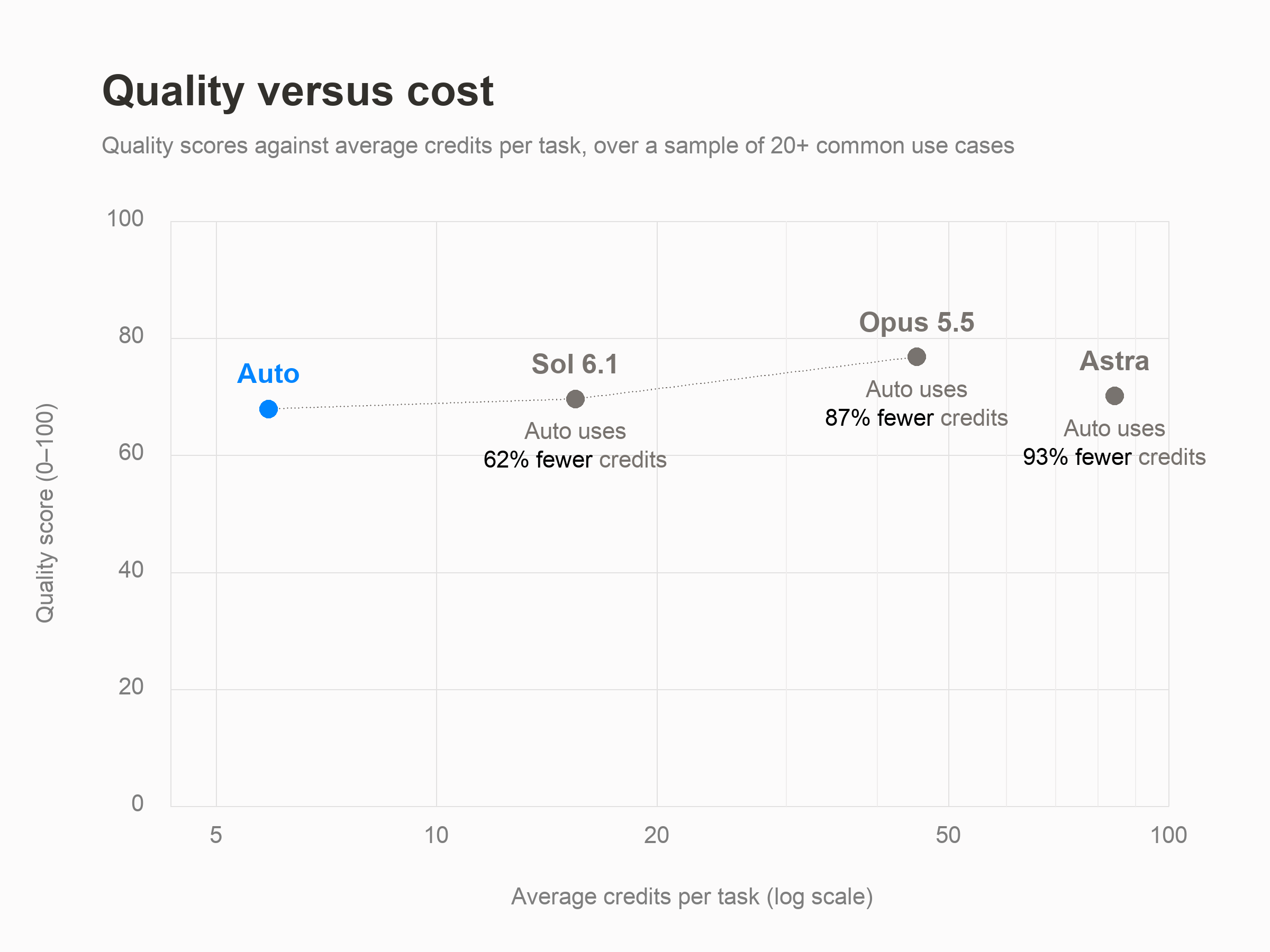
On those runs, Notion says Auto delivers roughly 90% of the quality of frontier models such as Opus 5.5 and GPT-6 Astra, at about 90% lower average cost. The help center states a related figure: in Notion's testing, Auto's average cost was 87% lower than Opus 5.5. Credit estimates for simple, medium, and complex tasks are in Notion AI credits explained.
Why it matters
Leaving the picker on Auto is how a Business or Enterprise seat stretches 1,500 Standard credits. Picking a model yourself spends the smaller Select pool. Notion's help center says that for most everyday work, Auto can make credits go up to 10 times further than pinning a top model.
Auto can also change models during a task. A quick step can stay on a lighter model. A harder step can move to a more capable one, then back. If the model in use gets stuck, Auto can switch in the same thread and keep the work already underway, instead of starting over. You cannot currently see which models it used.
Workspace owners still set the boundary. Auto uses only models the workspace allows.
- Restrict one model, and Auto falls back to the next lowest-cost model that is still allowed.
- Restrict a provider, and Auto cannot use that provider's models.
- Turn off too many models, and Notion warns that Auto will get less efficient.
Models the workspace has turned off do not appear in the picker. Restricted models are listed and cannot be selected.
When to pick a model yourself
Stay on Auto for ordinary writing, search, and summaries. Pick a model when you need the same model for the whole chat, you prefer one model for that kind of work, or Auto's result was not good enough. In Notion Agent, select Auto to open the picker, compare speed, intelligence, and cost, then select a model. In a Custom Agent, set the model in the agent's settings and save. Switch back by choosing Auto again.
These quality and cost figures are Notion's. Reproduce them on a task you care about before you budget a team around them.
Frequently asked questions
What is Notion Auto?
Auto is Notion's model router. It chooses a model for each task from several providers, balancing quality, speed, and cost. It is on by default in Notion Agent and in Custom Agent settings. It is not a model Notion trained.
How does Notion decide which model Auto uses?
Notion evaluates models on real workspace tasks inside a simulator it calls Gymmy, ranks them with pairwise Elo across seven rubrics, and then routes each task. The lineup changes as new models ship. Auto also skips any model or provider an admin has turned off.
Does Auto use the same model for a whole chat?
Not necessarily. It can switch during a longer task, including moving to a more capable model when the work gets harder or the current model is stuck, and it keeps that thread's work. Notion does not show which models it chose.
How many credits does Auto use compared with Opus 5.5?
Notion's October 20 table estimates 5 versus 50 credits for a simple task, 10 versus 85 for a medium task, and 25 versus 150 for a complex task. Auto spends Standard credits. A model you pick spends Select credits. See the credit pools.
Which plans include Auto?
The new credit system, including Auto's Standard-credit pricing, is on Business and Enterprise. New workspaces moved on October 19, 2026. Existing workspaces move on November 2, 2026.