Ask Notion Agent to Suggest Edits Before Applying Changes

Dave de Cespedes
September 11, 2026
5 min read
Updated September 11, 2026
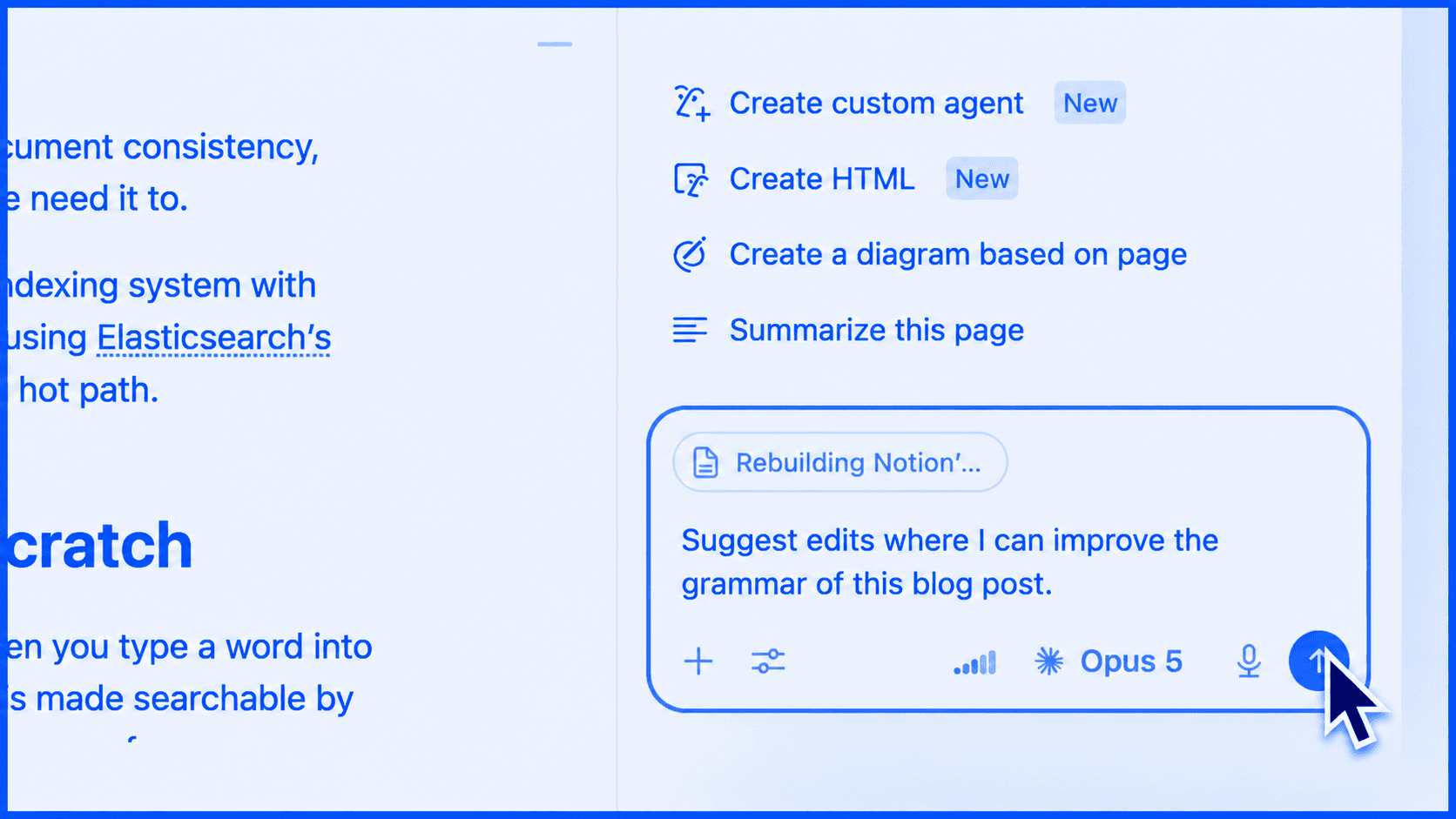
To get reviewable changes in Notion Agent, ask it to suggest edits. The feature announced on August 28 lets the agent propose changes instead of applying them directly, so you can review and approve them from the top of the document down. Notion specifically highlights line-level work such as grammar corrections. Read the announcement.
This is useful when a document is already close. You want a clearer sentence or a corrected typo without losing the wording someone has carefully chosen.
The practical change is in the request: tell the agent what kind of review you want, what it should preserve, and that you want suggestions. The prompts below are ready to adapt to one document this week.
Start with a narrow editing task
Choose one page and one purpose. A grammar pass is easier to review than a broad request to “improve this document.” The broad version leaves the agent to decide whether improvement means a new structure, a different tone, or a stronger claim.
Try this:
Suggest edits to this page for grammar and sentence clarity. Preserve the meaning, headings, examples, names, dates, numbers, and links. Keep the changes small. Propose the edits for my review instead of applying them directly.
These are recommended prompt constraints, not a guarantee that every suggestion will follow them. Read the proposed changes before approving them.
Review meaning before polish
A smooth sentence can still change the commitment.
Consider this invented example from a project brief: “The team aims to finish the review on Friday.” A suggested revision to “The team will finish the review on Friday” reads more confidently, but it changes an aim into a promise.
That is the kind of edit to catch before acceptance. Check whether the new sentence changes who owns the work, what must happen, or how certain the claim is. Grammar is only one part of the review.
For shared documents, the person approving the edits should understand the substance. A tidy paragraph does not replace a decision from the person responsible for the work.
Use separate passes for separate problems
Work through the document in a sensible order:
- Choose the scope. Name the page or section and the specific editing task.
- Ask for suggested edits. Include the details that must remain intact.
- Review each proposed change. Compare meaning, facts, and tone before accepting it.
- Read the resulting passage. Check that individually useful edits still make sense together.
Do the small language pass first. If you also want structural feedback, request that separately. Combining grammar, reorganization, fact checking, and tone changes in one request makes it harder to see why a sentence changed.
Two prompts for common documents
A process page with settled steps
Suggest small edits that make this process page easier to follow. Preserve the order of the steps, the responsible people, the tool names, and every condition or exception. If a step is ambiguous, point out the ambiguity instead of inventing the missing instruction. Leave changes for review.
Use this when the process is agreed and the wording needs work. If the process itself is unclear, resolve that with its owner before asking an agent to make it sound finished.
A proposal that needs a final language pass
Suggest edits for clarity and grammar in this proposal. Preserve the scope, deliverables, price, dates, exclusions, and approval terms exactly. Do not add claims or commitments. Flag any sentence that needs a decision from me. Propose changes for review.
Check the protected details yourself even after making this request. In a proposal, changing one qualifier can matter more than fixing ten awkward sentences.
What suggested edits do not settle
Suggested edits give you a way to review a proposed change. They do not establish whether a statement is true, whether the team agreed to it, or whether the document is ready to share.
If a sentence contains an unsupported claim, ask for the source or remove the claim. If two sections disagree, bring the conflict to the document owner. An editing pass should make unresolved decisions easier to see.
Common questions
What should I type to start?
Use “suggest edits,” then name the kind of improvement you want. That is the starting instruction in Notion’s release note.
Should I use this for a full rewrite?
Use it when you want to inspect individual changes. For a substantially different structure, ask for a separate outline first so you can decide on the direction before rewriting.
Does asking for suggestions replace review?
No. Compare each proposed change with the original meaning, especially where the page assigns responsibility or makes a commitment.
Open one document this week and ask for a narrow grammar pass using suggest edits. Approve the changes only after checking what they mean.
Image: Notion. Blue treatment by Notion Coach. Original release artwork.