
Notion upgrades version history for changes by people and agents
TL;DR
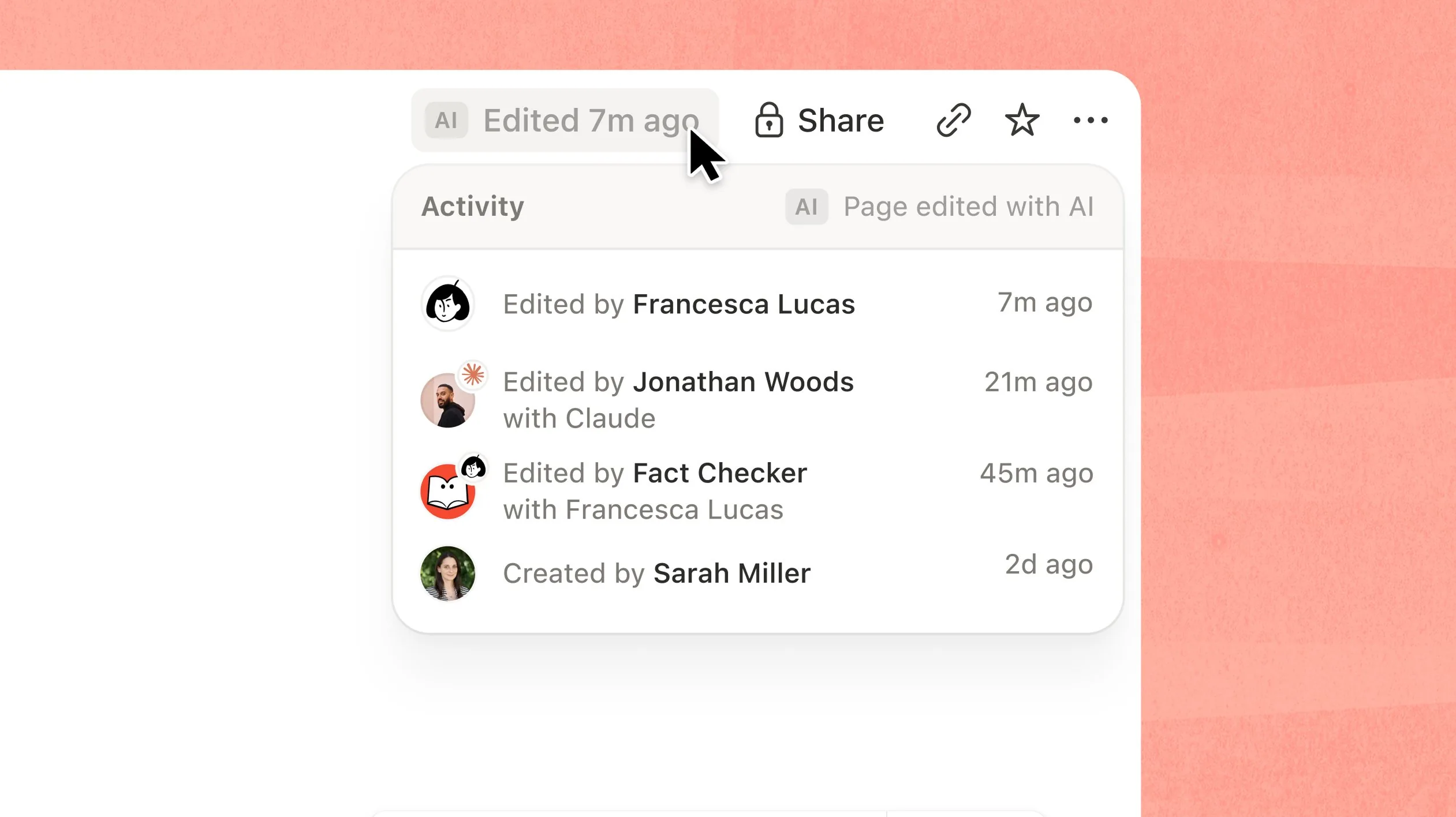
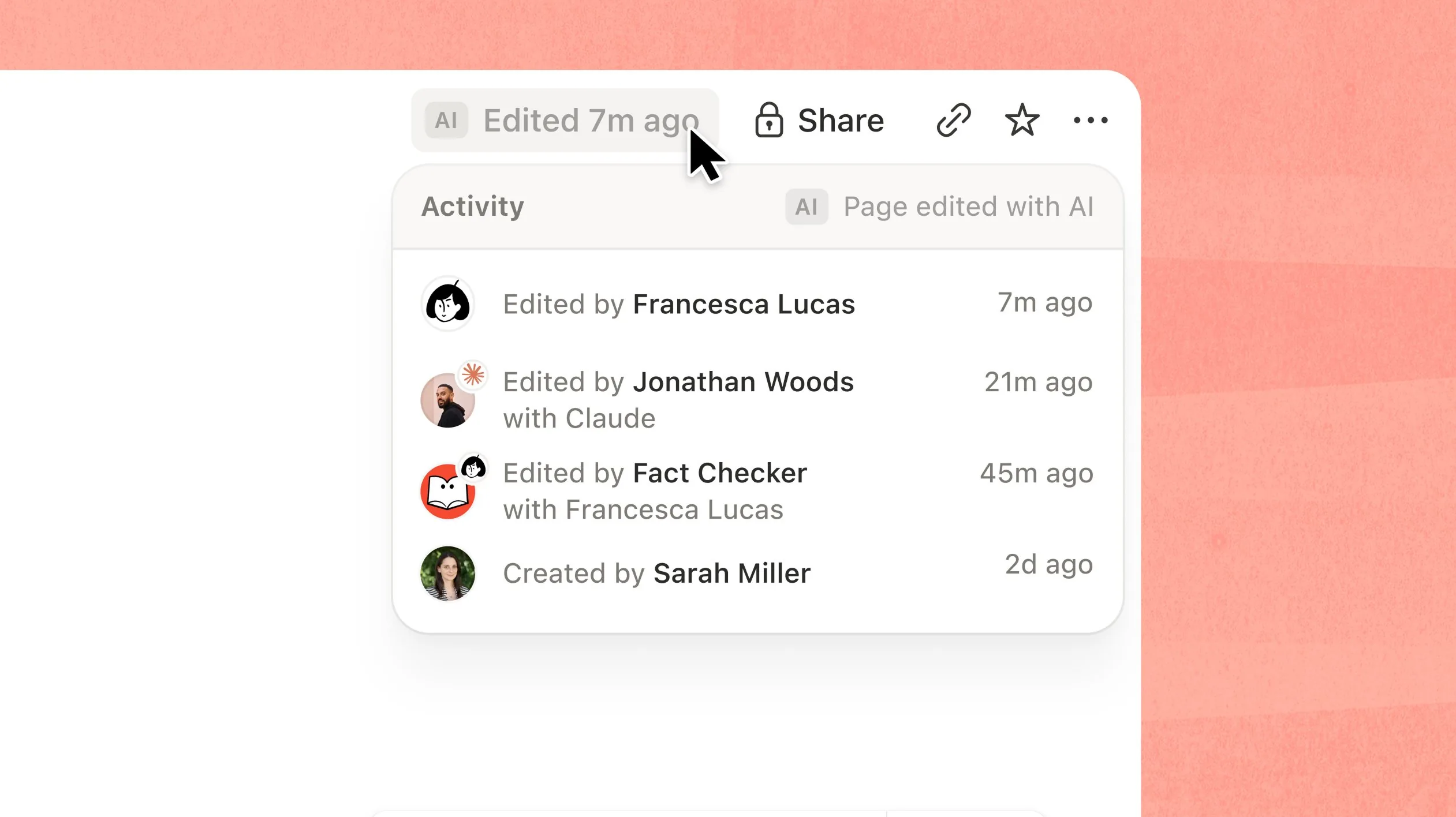
Notion 3.8, released October 13, 2026, upgrades version history with highlighted edits, database change details, and attribution. On October 21, selecting a block showed the last teammate or AI agent, and on October 29 Notion said Last edited by shows which agent, MCP client, or automation made a change and that the name should link to the exact edit or chat. On October 27, Notion added notion-view-version so MCP can read a past page or database version. On October 29, notion-get-version-changes lists what changed between two times and who changed it. On November 3, notion-restore-version restores a page or database to how it looked at a past time.
- Status
- Live
- Released
- Plans
- Not specified
- Source
- Notion 3.8 release notes
What changed
Notion's updated history presents changes across pages and databases with clearer attribution and highlighted edits. The restoration flow includes a preview of what an earlier version would affect.
The update is part of Notion 3.8, which also introduced database column permissions.
On October 21, Notion demonstrated block-level attribution. Select an individual block on a page and Notion shows which teammate, or which AI agent or bot, edited it last, plus what changed, inline on the block. @ivanhzhao posted the same behavior: the last editor can be a person or an agent.
Update, October 29: Notion said Last edited by now shows which agent, MCP client, or automation made a change. In that thread, Notion said the name should link to the exact edit, or the chat where the change was made, and that this includes external agents connected through MCP. As of October 30, 2026, the October 13 release notes and the version history Help page do not describe this label.
Read a past version with Notion MCP
Update, October 27: notion-view-version lets a connected assistant read a page or database as it looked at a past time. Pass the page and an ISO 8601 time.
- Pages: the tool returns the earlier properties and Markdown content.
- Databases: it returns the earlier data sources, views and rows.
- Access: it requires edit access to the page, and can only read as far back as the workspace's plan keeps version history.
For example, ask what a launch plan looked like last Monday or which rows were in a tracker at an earlier date. notion-view-version only reads that past version.
Update, October 29: notion-get-version-changes lists what changed in a page or database between two times and who made each change, including edits from Notion AI, Custom Agents, and MCP clients. The range defaults to the last 24 hours. It needs edit access and can only read as far back as the workspace plan keeps version history. It lists the changes. It does not return the full earlier page, and it does not restore anything.
Update, November 3: notion-restore-version restores a page or database to how it looked at a past time. The restore undoes every edit made after that time, including other people's, and removes comments added after it. Subpages and database row pages keep their content, so each one is restored on its own. Databases inside a page stay as they are unless you set include_inline_databases to true. Call the tool once without user_confirmed. Nothing changes, and the response says what the restore would undo. Only after the person agrees, call it again with user_confirmed set to true. The restore then runs in the background. It needs edit access to the page and the update content capability, and it can only go back as far as the workspace plan keeps version history.
Why it matters
When an agent updates shared work, the team needs to see the edit without opening a separate history panel for the whole page. Block attribution makes that check local: the block itself names the last editor. On October 29, Notion said Last edited by names the agent, MCP client, or automation, and that the name should link to the exact edit or the chat where the change was made, including an external agent connected through MCP.
Page history in Notion is still where a person previews and restores an earlier version. Attribution tells you who touched a block. It does not by itself undo the change. Since October 29, 2026, an MCP assistant can list what changed between two times and who changed it, including Notion AI, Custom Agents, and MCP clients, without restoring the page. Since November 3, 2026, an MCP assistant can also restore a page or database with notion-restore-version, after it shows what that restore would undo. For a database cleanup, compare the relevant changes before restoring anything, and coordinate with the people who maintain that database. The restore undoes later edits by other people too.
Frequently asked questions
Does Last edited by name the agent, MCP client, or automation?
Yes. On October 29, 2026, Notion said Last edited by shows which agent, MCP client, or automation made the change, including external agents connected through MCP. Notion said the name should link to the exact edit, or the chat where the change was made. The October 21 demo still shows the last editor on a selected block when that editor is a teammate or an AI agent or bot, and what changed.
Can Notion MCP read an earlier page or database version?
Yes. Since October 27, 2026, notion-view-version can read a past page or database using an ISO 8601 time. It returns page properties and Markdown, or database data sources, views and rows. It needs edit access and stays within the workspace plan's version-history window. Reading an earlier version does not restore it. Restoring is a separate tool, notion-restore-version, added on November 3, 2026.
Can Notion MCP list what changed on a page and who changed it?
Yes. Since October 29, 2026, notion-get-version-changes lists what changed in a page or database between two times and who made each change, including edits from Notion AI, Custom Agents, and MCP clients. The range defaults to the last 24 hours. It needs edit access and stays inside the workspace plan's version-history window. Listing changes does not restore the page. Reading one past version is notion-view-version, and restoring is notion-restore-version.
Can Notion MCP restore a page or database to an earlier version?
Yes. Since November 3, 2026, notion-restore-version restores a page or database to how it looked at a past time. It undoes later edits, including edits by other people, and removes comments added after that time. Call it first without user_confirmed so nothing changes and you can read what would be undone. Call it again with user_confirmed set to true only after the person agrees. It needs edit access and the update content capability, and it stays inside the workspace plan's version-history window.
Does this give every plan unlimited history?
No. The redesigned history does not establish unlimited retention for every plan. Check the Help Center's current plan-specific history access before relying on a recovery window.
Does restoring a database reset property access rules?
No. Notion's property-access documentation says restoring an earlier database version retains the current property access rules.
Sources
- Notion 3.8 release notes (Oct 13, 2026)
- Notion developer changelog: restore past versions in MCP (Nov 3, 2026)
- Notion MCP: Restore a past version (verified Nov 4, 2026)
- Notion developer changelog: see version changes in MCP (Oct 29, 2026)
- Notion MCP: Get version changes (verified Nov 5, 2026)
- Notion developer changelog: view past versions in MCP (Oct 27, 2026)
- Notion MCP supported tools: View a past version (verified Oct 29, 2026)
- NotionHQ on X: Last edited by names the agent, MCP client, or automation (Oct 29, 2026)
- NotionHQ on X: the name should link to the edit or chat (Oct 29, 2026)
- NotionHQ on X: external agents connected through MCP are included (Oct 29, 2026)
- NotionHQ on X: block-level edit attribution (Oct 21, 2026)
- NotionHQ on X: October 24 rundown
- @ivanhzhao on X: block attribution for people and agents
- Version history and restoration
- Database property access