
Notion API and MCP add full-page meeting notes
TL;DR
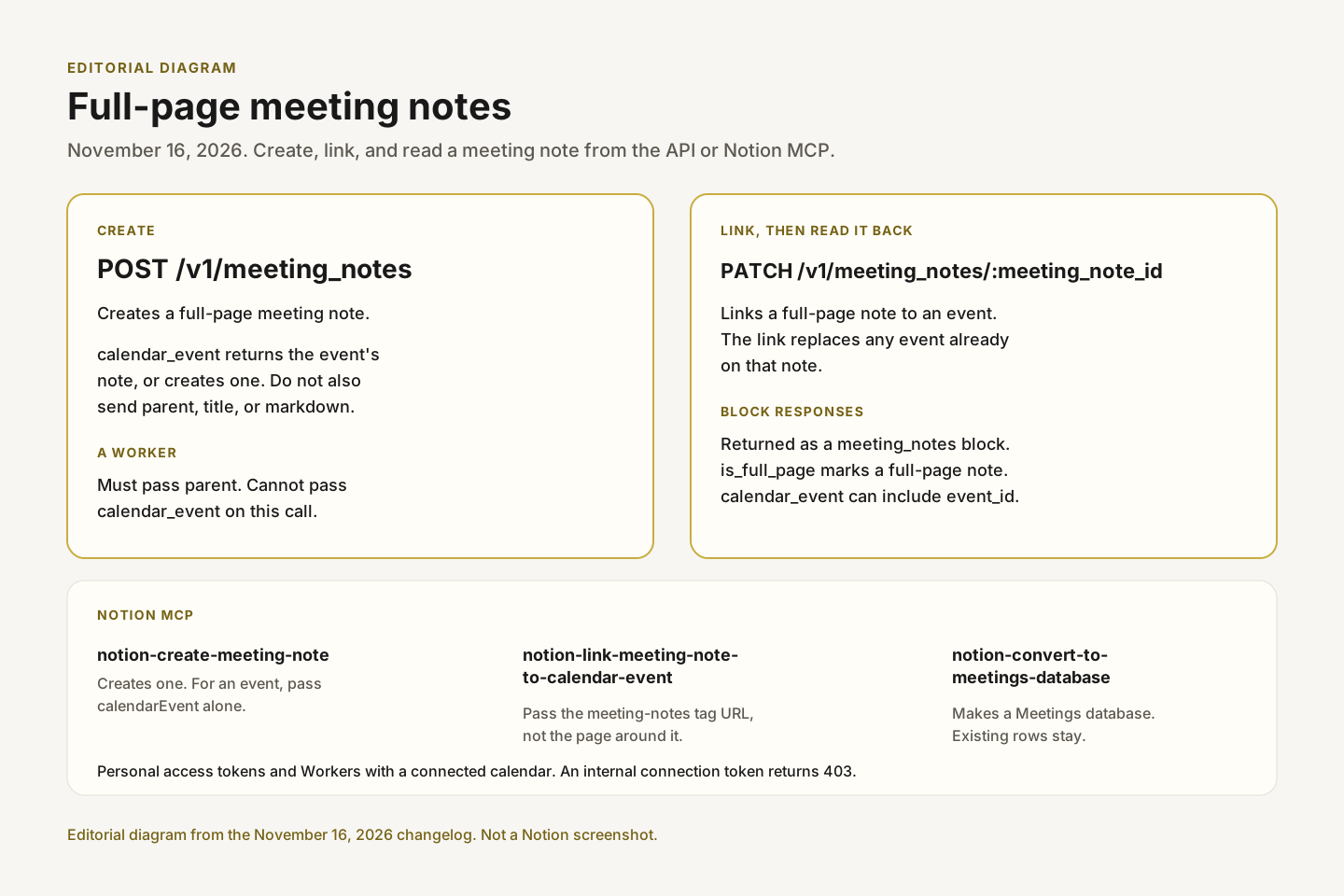
On November 16, 2026, Notion's API can create a full-page meeting note with POST /v1/meeting_notes and link one to a calendar event with PATCH /v1/meeting_notes/:meeting_note_id. Block endpoints return those notes as meeting_notes blocks, which include is_full_page, and calendar_event includes the event's event_id. Notion MCP adds notion-create-meeting-note, notion-link-meeting-note-to-calendar-event, and notion-convert-to-meetings-database.
- Status
- Live
- Released
- Plans
- Not specified
What changed
On November 16, 2026, Notion's developer changelog added three meeting notes changes for the API and for Notion MCP. The changelog and the linked reference pages do not name a plan.
Create a full-page meeting note
POST /v1/meeting_notes creates a full-page meeting note. The response returns it in meeting_note as a meeting_notes block. A note this call creates has is_full_page set to true. The response field created is true when Notion created the note and false when it returned an existing one.
Where the note goes depends on the body:
parentcreates the note in that page or data source. If the data source is not a meetings database, Notion adds a page and puts the meeting note inside it.- With no
parentand nocalendar_event, Notion creates the note in the user's meeting notes database, and creates that database if the user does not have one. Every call withoutcalendar_eventcreates a new meeting note. calendar_eventreturns the event's existing meeting note or creates one. Notion files and titles it like the event's other meeting notes. That request cannot also includeparent,title, ormarkdown.
markdown, when the request does not use calendar_event, sets the content of the Notes tab. The reference says the API cannot add content to the meeting note after a calendar_event call. The same page's calendar_event description says to add content afterwards, and it does not name that later request.
created is false when the call returns an existing note. That existing note can be a meeting notes block inside a page, with is_full_page set to false. If the event already has a meeting note the user cannot read, Notion creates a new one, so the event then has two meeting notes.
The REST API has no calendar endpoint yet. Event IDs come from notion-calendar-list-events in Notion MCP. Pass that tool's calendar.accountId, calendar.calendarId, and eventId as calendar.account_id, calendar.calendar_id, and event_id. Those calendar tools shipped in Notion MCP's October update.
The endpoint accepts personal access tokens and Workers. The integration needs the Read content and Insert content capabilities. A 400 means the request combined calendar_event with parent, title, or markdown, a Worker passed calendar_event or left out parent, or a Worker has no working calendar connection. A 403 means the token is not a personal access token or a Worker, or the user cannot edit the parent. A 404 means the parent does not exist or the integration cannot access it.
Creating meeting notes from an uploaded audio or video file is a different endpoint, POST /v1/blocks/meeting_notes. The home screen widget and the Google Meet add-on start a recording in the product. They are not this API.
Workers
A Worker that calls POST /v1/meeting_notes needs a connected calendar. It acts as itself. The parent must be shared with the Worker, and the Worker is recorded as the meeting note's creator. A Worker must pass parent and cannot pass calendar_event. To link the note to an event, call PATCH /v1/meeting_notes/:meeting_note_id next.
The worker guide says the parent should be a meetings database shared with the worker. The same section says this works with the token Notion provides to the worker, or with a personal access token. An internal connection API token returns a 403.
The guide shows a create request with parent, then a patch that sends calendar_event. If the event already has other meeting notes, the link request returns a 409. The guide says to delete the meeting note you created, or to pass allow_other_meeting_notes: true to link anyway.
Link a full-page meeting note to a calendar event
PATCH /v1/meeting_notes/:meeting_note_id links a full-page meeting note to a calendar event and returns it in meeting_note as a meeting notes block. The link replaces any event the meeting note is already linked to.
By default, the endpoint does not link a note to an event that already has other meeting notes. It returns a 409 with their IDs in additional_data.other_meeting_note_ids. Pass allow_other_meeting_notes: true to link anyway. On success, other_meeting_note_ids lists the other meeting notes you can read that are linked to the same event. For a meeting note inside a page, the ID is the page's. Notion checks at most 50 meeting notes, so the list may be incomplete.
A Worker needs a connected calendar, and the event's calendar must be one the Worker can read. The meeting note must be shared with the Worker. If this call returns a 409, the reference says to delete the meeting note the Worker created or to pass allow_other_meeting_notes: true.
This endpoint accepts personal access tokens and Workers. It needs the Read content and Update content capabilities. A 400 means the block is not a full-page meeting note, or a Worker has no working calendar connection. A 403 means the token is not a personal access token or a Worker, the user cannot edit the meeting note, or a Worker cannot read the event's calendar. A 404 means the meeting note does not exist or the integration cannot access it.
Full-page meeting notes in block responses
Block endpoints return full-page meeting notes as meeting_notes blocks, with is_full_page set to true. On the meeting notes block, is_full_page is true for a full-page note and false for a meeting notes block inside a page. calendar_event can include start_time, end_time, attendees, and event_id. The reference calls event_id the optional ID of the calendar event. Every field except is_full_page is present only when that data is available.
Meeting notes blocks cannot be created or updated with the general block endpoints. Use the child block IDs in children (summary_block_id, notes_block_id, and transcript_block_id) with Retrieve a block or Retrieve block children to fetch each section.
Meeting note tools in Notion MCP
The changelog points to Create a meeting note for three tools.
notion-create-meeting-note creates a full-page meeting note. content goes in the Notes tab. Without parent, the note goes where the user's meeting notes go by default. If parent is a regular database, the tool tells the MCP client to ask the user whether to convert it with notion-convert-to-meetings-database first. For a scheduled meeting, find the event with the calendar tools and pass calendarEvent without parent, title, or content. The tool returns the event's existing meeting note with status existing, or creates one filed and titled like the event's other meeting notes.
notion-link-meeting-note-to-calendar-event links an existing full-page meeting note to a calendar event found with the calendar tools. A meeting note embedded in a page appears as a <meeting-notes> tag. Pass the URL from that tag, not the URL of the page around it. If the event already has other meeting notes, the result lists them in otherMeetingNoteUrls.
notion-convert-to-meetings-database turns a regular database into a Meetings database, so its rows can be meeting notes. Existing rows stay as they are. Pass dateProperty or attendeesProperty to reuse an existing property. Otherwise the tool reuses a single matching property or creates a missing one.
Clients still pointed at https://mcp.notion.com/sse have a separate change to make. Notion MCP is retiring that legacy endpoint on February 23, 2027.
Why it matters
A script, a Worker, or an assistant can file the meeting note for a calendar event, or attach a note that already exists, without someone creating that page by hand. Personal access tokens and Workers with a connected calendar can call both endpoints. An internal connection token cannot.
The Worker path is two calls. POST /v1/meeting_notes will not take calendar_event from a Worker. Create the note under a parent the Worker can edit, then link the event. A 409 is the default when that event already has other meeting notes. Linking anyway is the explicit flag allow_other_meeting_notes.
An MCP client should pass the URL inside the <meeting-notes> tag when it links a note. If it is about to create a note in a regular database, the create tool asks before that database becomes a Meetings database. Conversion keeps the rows that are already there. Name dateProperty or attendeesProperty when an existing property should be reused.
Event IDs still come from Notion MCP calendar tools, because the REST API has no calendar endpoint yet.
Frequently asked questions
How do I create a full-page meeting note with the Notion API?
Send POST /v1/meeting_notes. With parent, the note is created in that page or data source. With no parent and no calendar_event, it is created in the user's meeting notes database, which Notion creates if needed. With calendar_event, the call returns the event's existing meeting note or creates one, and that request cannot also include parent, title, or markdown.
Can a Notion Worker attach a meeting note to a calendar event in one call?
No. On POST /v1/meeting_notes a Worker must pass parent and cannot pass calendar_event. Create the note, then link it with PATCH /v1/meeting_notes/:meeting_note_id. The Worker needs a connected calendar. An internal connection API token returns a 403. A personal access token, or the token Notion provides to the Worker, is accepted.
Which Notion MCP tools create or link meeting notes?
notion-create-meeting-note creates a full-page meeting note, optionally for a calendar event. notion-link-meeting-note-to-calendar-event links an existing full-page meeting note to an event. notion-convert-to-meetings-database turns a regular database into a Meetings database and leaves existing rows in place.
Which Notion plans include the full-page meeting notes API?
The November 16 changelog, the endpoint references, the worker guide, and the MCP tool pages do not say.
Sources
- Notion developer changelog: full-page meeting notes (Nov 16, 2026)
- Create a full-page meeting note
- Link a full-page meeting note to a calendar event
- Using Notion API from a worker
- Block: Meeting notes
- Notion MCP: Create a meeting note
- Notion MCP: Link a meeting note to a calendar event
- Notion MCP: Convert a database to a Meetings database
- Create a meeting note from uploaded media